The Inbox Had 28,880 Files
I opened 0. Inbox/ one evening and the file count stopped me cold. 28,880 files. Voice memos I’d dictated while driving and never transcribed. Email forwards I’d sent myself six months ago. Quick thoughts I’d jotted down and forgotten. 707 lines of stuff to actually process.
I had built a capture machine with no off-ramp.
I got that down to 49 lines a day — a 92% reduction. The number is not the point. My mornings changed when I stopped deciding what to work on while I was least equipped to decide.
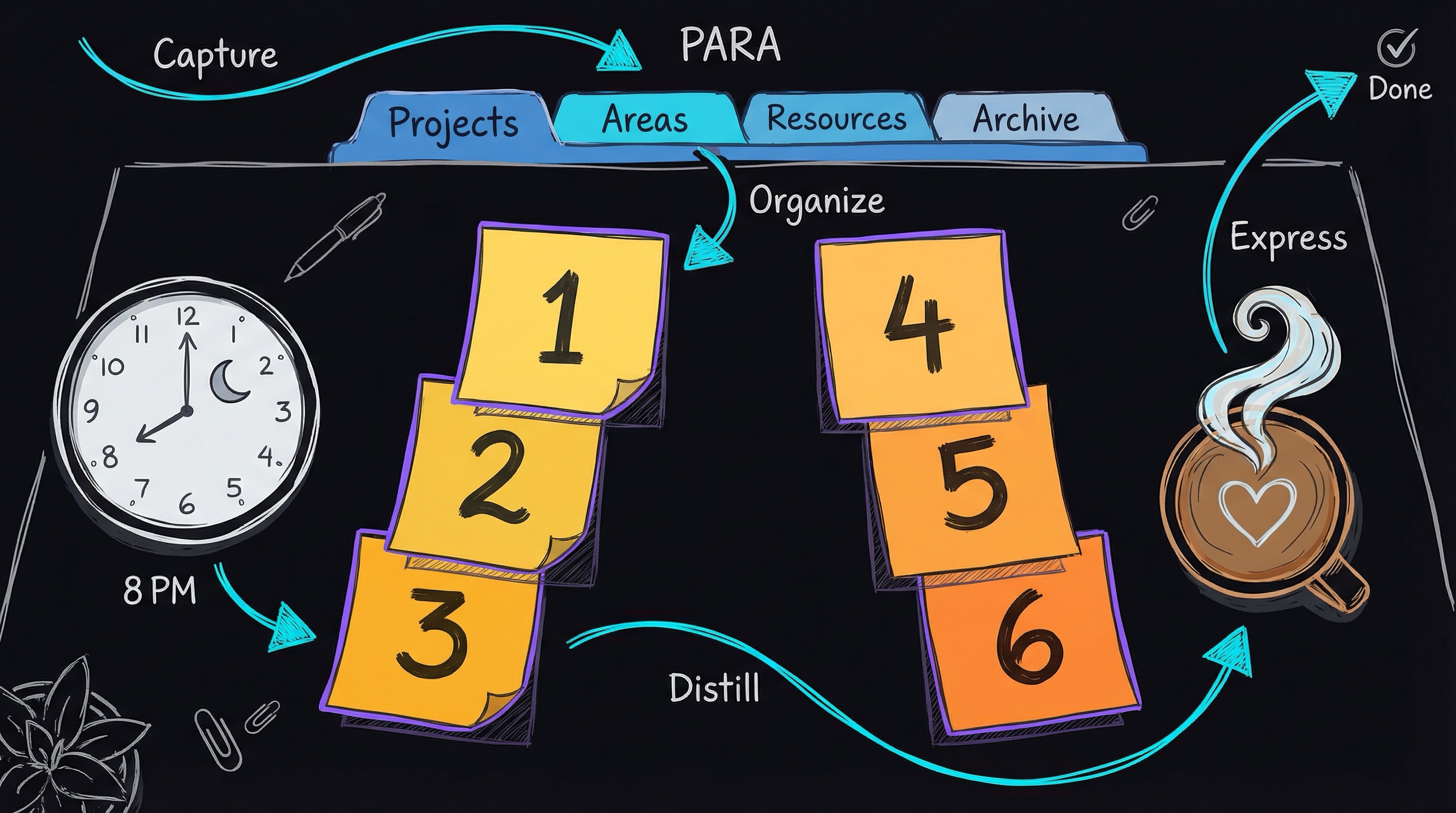
Six Tasks, Written the Night Before
In 1918, an efficiency consultant named Ivy Lee handed Bethlehem Steel president Charles Schwab a method so simple Schwab later paid him $25,000 for it — about $400,000 in current dollars. The method is five rules:
- At the end of each workday, write down the six most important tasks for tomorrow.
- Rank them in strict priority order.
- The next day, start on task #1. Work on nothing else until it’s done.
- Move to #2. Then #3. Keep going.
- Whatever doesn’t get done rolls to tomorrow’s list.
I tried it. Then I kept trying it for six months.
The six slots force a decision. Constraint creates clarity. A “nice to have” cannot hide at position #14 and pretend to be today’s work. Thirty things compete for attention; only six make the cut. The other 24 do not. Tomorrow, maybe. Today, no.
The second mechanism is even more important: the decision happens at night. Evening-me has context: what actually happened today, what is on fire, and which deadline is closest. Morning-me has none of it. Morning-me opens email and lets someone else’s urgency become the priority. Morning-me cannot be trusted with the decision.
The list is a commitment device: it moves the decision out of the morning, when willpower is lowest. Evening-me chooses what matters; morning-me executes in order. That means better decisions at night, better execution in the morning, better outcomes by week’s end, and better learning in the evening review.
This is harder than it sounds.
The urge to break the sequence is constant. Task #4 looks more fun than task #1. A Slack message arrives and feels urgent. Waiting on someone makes task #1 look “blocked” — and sometimes it is, but usually that is avoidance. The rule stays simple: #1 until it is done, then #2. No multitasking. No quick email checks. Sequential execution removes decision fatigue.
Most days I finish four or five of the six. That is actual progress — not checkbox theater on a 30-item list where the easy eight get done and the two that matter get avoided. Productive days are not the ones with the most checked boxes. They are the ones that move the most important work forward.
What happens before bed
I spend 15 to 20 minutes on this every night. I start by looking at what got done today, not to feel guilty about what did not, but to find a pattern. If task #5 has rolled forward four days in a row, it is either not important or too large and needs to be broken down. The pattern tells me more than one day does.
From there I open 1. Projects/ in Obsidian and look through each folder. What needs to move tomorrow? What is blocked? Which deadline is close? This catches the follow-up I promised someone and the document due Friday.
Areas run on their own clocks. Arcs Health operations needs daily attention. Biblical education reading happens weekly. Second brain cleanup happens monthly. I pull in whatever maintenance task is due from those ongoing responsibilities.
The inbox comes next, but not email. My 0. Inbox/ in Obsidian holds voice memos, forwarded emails, quick notes, and web clippings. Actionable items become tasks, perhaps one of tomorrow’s six. Reference material goes to Resources. Junk gets archived. The goal is zero: everything has a home by the end of the evening.
Ranking the six tasks is the hard part. They go from 1 through 6 by impact, not ease, fun, or what I feel like doing. The task I least want to do often becomes #1 precisely because I am avoiding it. If that is all I finish tomorrow, the day still moved something that mattered.
Everything goes into a single file called Today.md:
# 2026-01-24

## Priority Tasks
1. [ ] Complete Nashville financial due diligence report
2. [ ] Draft Q1 2026 board memo (operational metrics)
3. [ ] Review behavioral health launch timeline with team
4. [ ] Process 50 inbox captures (Python automation)
5. [ ] Update TELOS with Q4 outcomes
6. [ ] Write second brain blog post

## Context
- Nashville deal deadline: Jan 31
- Board memo due: Feb 5
- Focus: Close deals, document systems

## Notes
- [captures throughout the day]
One file. One source of truth. When I wake up, I don’t check email, Slack, or my calendar. I open Today.md and start on task #1.
PARA: Where Everything Lives
The six-task list handles execution, not storage. Knowledge work also creates notes, documents, emails, ideas, and reference material. Those need a home that makes them findable later.
Tiago Forte’s PARA methodology divides your entire digital life into four buckets:
Projects
A series of tasks with a goal and a deadline. “Launch behavioral health service.” “Close Nashville acquisition.” “Ship blog automation.” Projects are time-bound and have a clear finish line. When they’re done, they move to Archive.
Areas
Ongoing responsibilities with standards to maintain. “Arcs Health operations.” “Biblical education.” “Health and fitness.” “Second brain maintenance.” Areas never end — they’re life domains that need continuous attention. If something has no finish line, it’s an area, not a project.
Resources
Topics of interest, reference material, things you might use later. “QLA methodology notes.” “Python automation scripts.” “Healthcare regulations.” Not immediately actionable, but valuable when you need them.
Archive
Completed projects and inactive items. “2025 Q3 board deck.” “Covenant Clinics acquisition documents.” “Old blog drafts.” Archive keeps your active workspace clean while preserving history — nothing is ever lost, but it’s not cluttering your view.
The insight that makes PARA work is that it is organized by time, not category. “Work,” “Personal,” and “Health” do not say what comes next. Projects are for now, Areas for regular maintenance, Resources for eventually, and Archive for no longer active.
Here’s what my Obsidian vault actually looks like:
0. Foundation/          # Identity, strategy, frameworks
   ├── TELOS.md        # Personal mission, goals, metrics
   └── Substrate/      # Evidence base (problems, solutions, outcomes)

0. Inbox/              # Capture point (~29,000 items auto-processed)

1. Projects/           # Active projects with deadlines
   ├── Nashville Acquisition/
   ├── Behavioral Health Launch/
   └── Blog Automation/

2. Areas/              # Ongoing responsibilities
   ├── Arcs Health/
   ├── Biblical Education/
   ├── Health/
   └── Second Brain/

3. Resources/          # Reference and learning
   ├── QLA Methodology/
   ├── Python Scripts/
   └── Healthcare Industry/

4. Archive/            # Completed projects
   ├── 2025-Q3-Board-Deck/
   └── Covenant-Acquisition/
The 0. Foundation/ layer is my addition to PARA. It holds identity, mission, and strategic frameworks: the “why” behind everything below it.
The 92% Reduction: How the Automation Actually Works
The evening ritual worked until it reached the inbox. 0. Inbox/ had ballooned to 28,880 files. Processing that pile by hand would have taken forever, so I automated the mechanical part.
I built it in two layers.
A Python script uses pattern matching — no LLM calls and no network round-trips, just re and pathlib. It reads each capture, checks the sender domain, subject keywords, and existing YAML frontmatter fields, then archives it or promotes it into the right PARA folder. Marketing emails are archived without review. Operations emails are tagged for review and linked to the relevant Area. Project emails are linked to the active project and flagged for action.
A bash orchestration layer groups inbox files by capture date, slices them into batches of about 50, and feeds each batch to the Python stage. It processes one file at a time and validates the path before moving it, so the script cannot relocate the entire 0. Inbox/ directory by accident.
Before automation, I had 707 lines to process daily and spent 2–3 hours a week on manual triage. Afterward, it was 49 lines and 15–20 minutes a day. Automation removes mechanical work; it does not make decisions for me. It filters noise and surfaces signal, and I still review anything marked important.
Multi-Level Capture Architecture
Different kinds of capture need different levels of friction:
Level 1: Audio Capture. Voice memos while driving, walking, or thinking. These land in a Whisper transcription pipeline that converts speech to text with intelligent tagging:
# Whisper transcription + intelligent tagging
.scripts/transcription/process_audio.sh
Level 2: Quick Capture. Email forwards, web clippings, rapid notes. Straight to 0. Inbox/ with minimal metadata:
---
created: 2026-01-24T08:15:00Z
source: email
---

Subject: Nashville seller response
From: seller@example.com
Date: 2026-01-24

[content]
Level 3: Daily Processing. The evening ritual triages everything. Actionable items become tasks. Reference material moves to Resources. Junk gets archived.
Level 4: Project/Area Integration. Important captures get linked to Projects or Areas and tagged with Substrate connections — data sources, claims, outcomes in my evidence base.
CODE: Capture → Organize → Distill → Express
The inbox automation fits into a larger workflow — CODE, inspired by Tiago Forte’s work:
Capture has to be nearly frictionless. If capturing something takes more than 10 seconds, you won’t do it consistently. Voice memos transcribed automatically. Emails forwarded to inbox. Web content clipped with minimal metadata. The goal: never lose an idea because the mechanism was too heavy.
Organize happens during evening planning. Everything moves from 0. Inbox/ into its PARA home. Inbox zero every evening.
Distill extracts the essence from important captures. Not every note needs it, but the ones that do get progressive summarization: highlight key paragraphs on first read, bold important sentences on second review, highlight keywords within those bold sentences, write a one-to-two-sentence summary at the top. This creates layers — quick review reads the summary, deeper review scans the highlights, full deep dive preserves the original.
Express is the payoff. Blog posts. Project documentation. Board memos. Code. Strategic decisions. A note that never gets used is just digital clutter with better branding.
Progressive Disclosure: Don’t Process Everything Up Front
One principle keeps the whole system sustainable: process information when you need it, at the level of detail you need it. I borrowed this from software engineering — it’s essentially lazy loading for knowledge.
the mechanism: lazy enrichment + automation pipeline
The three-level schema is a lazy enrichment pattern: notes arrive as thin raw captures (Level 1), get promoted to structured PARA notes during triage (Level 2), and only reach full project context (Level 3) when the project is actually active. The key insight is that enrichment is deferred — you pay the cost only when the information becomes load-bearing.
The pipeline that makes this tractable at scale uses two layers:
Shell orchestration groups inbox files by capture date, slices them into batches of ~50, and feeds each batch to the Python stage. Critically, files are processed one at a time with path validation before any mv, so there’s no footgun that can relocate your entire 0. Inbox/ directory.
Python pattern-matching classifies each file with a small decision tree — sender domain, subject keywords, YAML frontmatter fields already present — and either archives it outright or writes a promoted Level-2 note into the appropriate PARA folder. No LLM call, no network round-trip; just re and pathlib.
Try it in any Obsidian vault with a single shell one-liner to measure your own promotion ratio:
# Count inbox files that already carry at least one PARA-shaped frontmatter key
grep -rl --include="*.md" \
  -e "^project:" -e "^area:" -e "^category:" \
  "0. Inbox/" | wc -l
A low count means your captures are still raw Level-1 — fertile ground for an evening-ritual triage pass or a 50-line classification script. A high count means your capture workflow is already doing the enrichment work for you.
Most notes — about 80% — need minimal processing: quick capture, filed in PARA, searchable if needed. About 20% deserve the full progressive summarization treatment. The system lets you distinguish between them instead of treating every scrap of text like a research paper.
Claude Code Reads My Second Brain
This isn’t just a static filing system. Claude Code has read-access to my entire Obsidian vault. When I’m working on a project, I can ask:
“What does my Substrate say about staffing optimization at Covenant?”
Claude searches 0. Foundation/Substrate/, finds the relevant claims and data sources, and synthesizes an answer grounded in my actual evidence base — not some generic advice from its training data.
The Substrate layer is my addition to PARA. It’s an evidence base that grounds decisions:
- Problems (PR-00001, PR-00002…): What’s broken?
- Claims (CL-00001, CL-00002…): What do I believe is true?
- Data Sources (DS-00001, DS-00002…): What evidence supports this?
- Solutions (SO-00001, SO-00002…): What are we trying?
- Outcomes (OUT-00001, OUT-00002…): What happened?
Every strategic decision links back to the Substrate. This prevents me from making the same mistake twice and builds institutional memory — the kind that usually evaporates when someone leaves a company. I can also delegate batch processing to Claude Code directly. “Process the 50 inbox captures from 2026-01-23. Archive marketing emails, create PARA notes for Arcs-related items, flag anything requiring my attention.” Claude runs the automation, reviews each capture, and returns a summary:
Processed 50 captures:
- 32 marketing emails → Archived
- 12 operations updates → Filed in Areas
- 4 project updates → Linked to active projects
- 2 requiring your review (flagged)
This is the real shape of the collaboration: the AI handles mechanical processing, I focus on judgment and strategy.
Wrong Turns I Made Along the Way
I spent months doing the opposite of what I’m describing here.
At one point I was running five separate systems: Jira for work tasks, Todoist for personal todos, Obsidian for notes, Google Calendar for time blocking, and email for follow-ups. Context switching between five places was killing my actual output. Worse, I’d spend mental energy deciding where to put a task instead of just doing it.
I’ve watched brilliant engineers spend hours configuring Notion databases, building elaborate Obsidian plugins, and color-coding their calendars — all while the actual work sat untouched. I was one of them. The trap isn’t the tools. The trap is confusing organizing work with doing work. Every minute spent tweaking a task management system is a minute not spent writing code, solving problems, or creating value.
The inbox bankruptcy moment — staring at 28,880 files and realizing I’d built a capture machine with no off-ramp — that’s what forced the redesign. I’d optimized for input and forgotten about throughput.
The version I would build now
If I started over, Week 1 would be only the PARA foundation: four top-level folders named 1. Projects/, 2. Areas/, 3. Resources/, and 4. Archive/. I would sort the current work by time: a deadline and an outcome make it a Project, an ongoing responsibility is an Area, and reference material belongs in Resources. Existing notes could move without perfect categories. Week 2 would add the daily list: six tasks in priority order in Today.md before bed, followed by #1 the next morning and sequential work from there. The same dodges would appear — “This email is urgent,” “Task #3 looks more fun,” “I’m not in the mood for #1 right now” — but the ranking would still come from the version of me who had the context.
Only during Weeks 3–4 would I add 0. Inbox/ as the capture point and process it during evening planning. Automation would start with obvious patterns. A bash one-liner that archives marketing emails is better than a 500-line pipeline that never gets finished. The ongoing Substrate evidence base would come last because it is only needed for high-stakes decisions or institutional memory: Problems/, Solutions/, and Outcomes/, with projects and decisions linked to those evidence-based entries. The specifics can evolve — seven tasks instead of six, a 30-minute ritual instead of 20, or organizing by project stage instead of PARA can all work. The smaller starting point is six tasks for tomorrow, worked in order. PARA, automation, and Substrate can wait.
Where the constraints loosen
Organizing can consume the time meant for actual work. Inbox processing gets 20 minutes max per day; if it takes longer, the capture process is too heavy or the automation is missing something. Perfect categories create the same problem. The time test is enough: a deadline means Project, ongoing means Area, and search works better than perfect filing when the answer is still unclear.
Task bloat and skipped planning pull at opposite ends of the list. When the “six” expands to ten and then fifteen, the constraint stays ruthless: all seven important items are ranked, but only 1–6 stay on today’s list. Number 7 goes on tomorrow’s. Skipping evening planning means waking without a plan and wasting morning hours deciding. The 20-minute block saves two hours the next morning, and a calendar block can keep that time from disappearing.
Inbox abandonment has a reset: inbox bankruptcy. When thousands of unprocessed files have piled up, everything older than 30 days moves to Archive and the inbox starts fresh. Unprocessed old captures do not magically become important.