I noticed it failing.
I’d asked Claude Code to do something complicated — the kind of thing that, six months earlier, would’ve produced a wall of half-correct freeform text, or a confidently wrong answer delivered with the same tone as a correct one. But this time it didn’t do any of that. It loaded a planning document. It ran a structured analysis across multiple steps. It reported the result in a format I recognized. Then it wrote what it had learned into a memory file — a markdown note stored on disk that would survive the session ending — and waited.
I didn’t tell it to do any of that. I’d wired it into the scaffolding weeks earlier and forgotten about it.
A workflow needed me to remember the steps. This kept doing them after I had forgotten about the setup. That was when I knew I had infrastructure, not just a workflow.
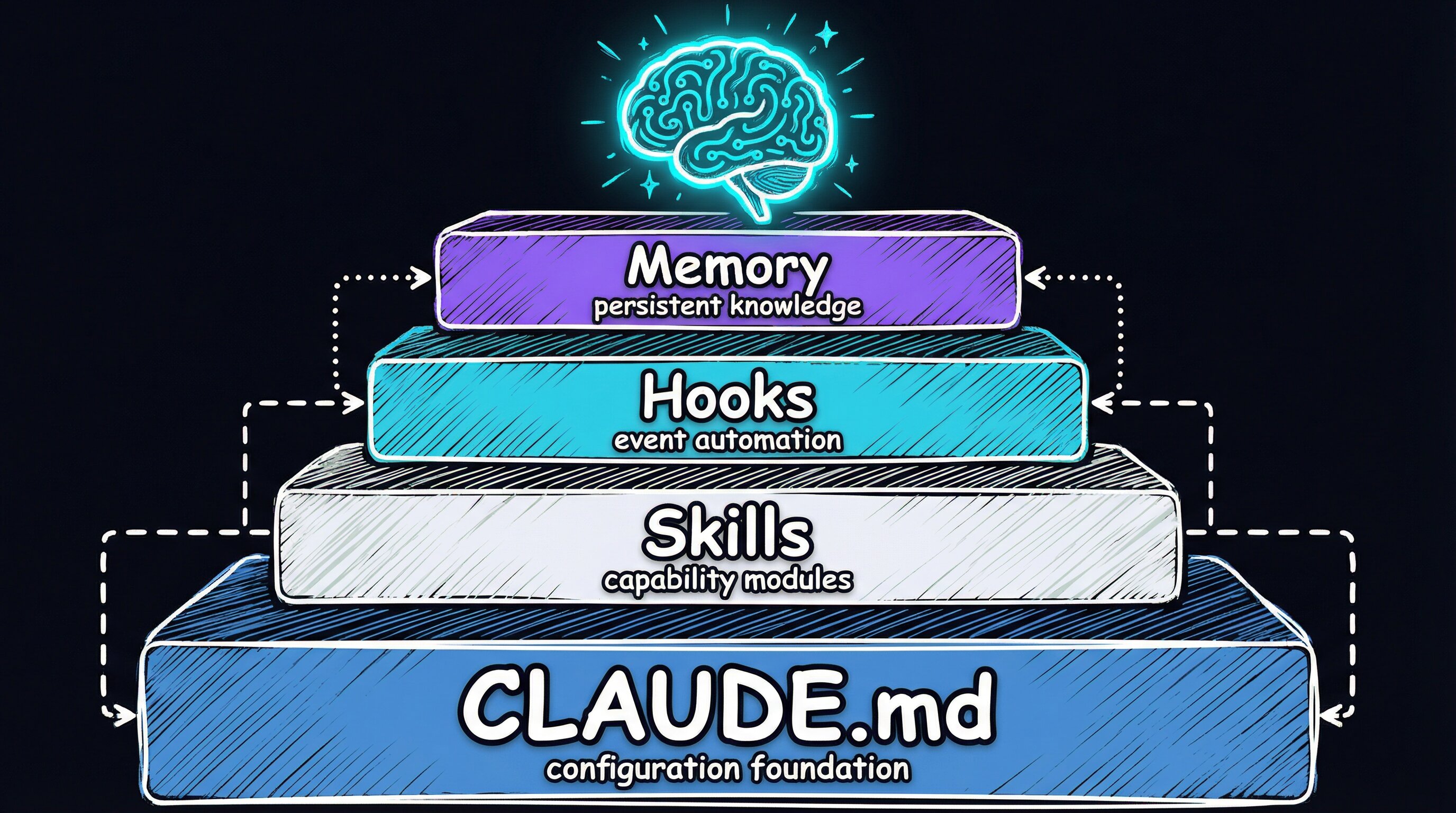
The layer underneath the project
I’ve written about project-level skills before — DevFlow, BugBot, things that live inside a specific repo and know how that repo works. Those matter. But there’s a layer underneath them: configuration that applies no matter what project I’m in, on any machine I sit down at.
I call that layer PAI — Personal AI Infrastructure. It has five pieces:
| Component | What It Does |
|---|---|
| CLAUDE.md | Global instructions: operating modes, stack preferences, machine topology |
| Skills | Reusable workflows invoked by slash command across any project |
| Hooks | Event-driven automation that fires on tool use and session events |
| Memory | Persistent markdown files that survive across sessions |
| claude-config repo | Git-versioned source of truth, CI-deployed to all machines |
The repo and deployment mechanics are in a companion post. Infrastructure costs once and pays forever: setting up the claude-config repo, writing the deploy script, and configuring CI runners on GitHub Actions took a weekend. Every session since has drawn on it. The ROI compounds. The interesting part here is what runs inside the layer.
Modes: locking the response format
The single change that paid off most was enforcing response modes. Every Claude Code session starts by classifying what I am asking:
- MINIMAL — “ok,” “thanks,” short answers
- NATIVE — quick single-step stuff
- ALGORITHM — multi-step, complex, or hard
NATIVE mode uses a fixed output template: task, work, change, verify, summary. ALGORITHM mode loads a formal planning document — the kind of structured spec you’d write if you were handing work to a senior engineer — and follows it to the letter. Freeform prose isn’t allowed in either.
I expected this to slow things down. It did the opposite. Once the output format was fixed, the assistant spent zero cycles deciding how to answer. It classified and executed. Sessions became faster and more predictable.
I got here by tripping over the same problem repeatedly. Without a strict response format, the assistant made different structural choices in different sessions. Sometimes that was fine. Usually it was noise. I spent the first five minutes of every session re-establishing the format. Locking it in the global config eliminated that entirely, so every session is predictable before it starts.
Skills that travel with you
Previous posts covered skills that live inside a project. User-level skills live in ~/.claude/skills/ — they’re deployed to every machine via the claude-config repo, and they’re available no matter what project you cd into.
I’ve got 43 of them now. They cover the full dev lifecycle:
| Category | Skills |
|---|---|
| Dev workflow | DevFlow (pipeline enforcer), BugBot (adversarial review), CodeReview |
| Content | BlogWriter, Media, Art (Excalidraw diagrams), VideoToSpec |
| Research | Research (multi-agent, 4 modes), Investigation, ContentAnalysis |
| Infrastructure | StandupService, DeployOneContext, ChromeMCP, AgentBrowser |
| AI development | Agents, Thinking, Prompting, gcc (memory commits) |
These are identity skills. They define how the assistant behaves everywhere, not just in one repo. DevFlow at the user level enforces the same git pipeline in a React app and a Python backend. I do not have to teach it again.
The global layer makes the project layer possible. Project-level skills can assume the global infrastructure is there. When a BugBot loop needs to spawn a parallel review agent, it does not define that agent inline; the user-level Agents skill handles it. Each layer amplifies the ones around it.
Hooks: automation that fires without asking
Claude Code supports hooks — scripts that run automatically on specific session events. I use three kinds:
Security. A pre-tool hook intercepts every shell command before it runs. It blocks patterns that look destructive — mass deletions, force pushes, anything that skips verification hooks. It’s a last-resort guardrail, written as a Bun TypeScript script that executes in under 50ms. If it catches something, the command never reaches the shell.
Audio. A voice hook calls a local notification server to announce which mode the assistant is entering. I hear when it shifts into a complex workflow without having to watch the screen. Useful when I’m pacing.
Memory. A post-operation hook fires after file writes and edits. It harvests significant context into structured markdown using the GCC memory system, so the next session can orient itself from where the last one left off.
The audio hook was a wrong turn at first. I had it announce every tool use. That was unbearable, so I reduced it to mode transitions.
Memory: making sessions remember each other
Claude Code does not remember previous sessions by default. Each one starts fresh, with no knowledge of what happened before. The GCC system (described in detail here) fixes that by committing structured context to markdown files in the repo. The files survive session boundaries and load at startup.
Two kinds of memory:
how the hooks + memory wiring actually works
Claude Code hooks are declared in settings.json and executed as subprocesses — they are not prompts, they are scripts. Each hook type maps to a lifecycle event:
// .claude/settings.json (abridged)
{
  "hooks": {
    "PreToolUse": [{ "matcher": "Bash", "hooks": [{ "type": "command", "command": "bun run .claude/hooks/SecurityPipeline.hook.ts" }] }],
    "PostToolUse": [{ "matcher": "Write|Edit", "hooks": [{ "type": "command", "command": "bun run .claude/hooks/WorkCompletionLearning.hook.ts" }] }],
    "Stop": [{ "hooks": [{ "type": "command", "command": "bun run .claude/hooks/ISASync.hook.ts" }] }]
  }
}
The hook receives the tool call as JSON on stdin and can block the operation by exiting non-zero. That’s the entire security model for the bash guardrail: parse the command, match against a pattern list, exit 1 with a reason string if blocked.
Memory retrieval uses BM25 keyword search over the markdown corpus (no embeddings required for fast lookup). At session start, a SessionStart hook calls a MemoryRetriever.ts script that scores all MEMORY/*.md files against the current project context, then @-imports the top matches into the live context window. Semantic organization by topic (one file per concern) is what makes BM25 effective here — a file named debugging.md with dense signal beats a chronological journal every time.
Try it: write a minimal Stop hook that appends a one-line summary to a local log file and wire it in settings.json. After a few sessions you’ll have a readable audit trail of what the assistant actually did — and a foundation to build the full memory system on.
The GCC paper gave me the useful distinction: agents need semantic memory organized by topic, not chronological logs. A file called debugging.md is more useful than a timestamp-sorted journal. My first attempt was chronological and nearly useless for retrieval. BM25 works better over topic-organized files because the filename already carries signal about the contents.
Tools used: Claude Code by Anthropic, Bun runtime for hooks, GitHub Actions for CI/CD. Source: RooseveltAdvisors/claude-agent-stack.